MY BLOG.html
I chose to engage with and review the tool, Obsidian1. A markup note taking and graphing application. I saw it a few times on my social media
recommended pages. I finally chose to use it when I was looking on my friends personal website's recommended tools2 and
decided to try it.
I have my niche. Mine is why I chose to study at UCC instead of other Universities.
Chinese Novels, often without official translation, are scattered in the internet, pursued by avid Chinese Learners, such as myself. They're often
without official translations, especially since I enjoy lgbtq+ themed novels.
And while it is my pleasure to find fan-translated thousand page novels. For the unpopular and poorly translated, done by machine (mtl), it is
less
then ideal to enjoy. So I settled on a goal. To learn Chinese and read these novels in the language intended to describe their landscapes,
artistry
,and imagery, to fill in the gaps of translation errors with my own efforts.
Chinese, however, been quite the journey. And over the years of my ever-evolving learning journey, I've used many tools. This blog explores my
latest addition, Obsidian.
Obsidian was made by Co-Founders Shida Li and Erica Xu, who developed it while attending Waterloo University, Ontario.
In an interview with NessLabs,3 Erica
mentioned how she wanted it to be a "holy-grail notetaking app". It is now developed by the company Dynalist,
a previous creation by Shida and Erica. Made during The Pandemic Quarantine of 2020, they set out to create this "holy grail" of note-taking.
Which is now used by many academics, but also by users for list making, daily trackers, or anything related to texts. This leads to my experience
with Obsidian and why I needed a new tool.
For building my early Chinese vocabulary I used a combination of a chrome browser extension, Zhongwen: Chinese English Dictionary 4
and PLECO 5 ,
a flashcard and note database creator for mobile devices. Essentially, Zhongwen, is a translator that works for any Chinese text you hover your
mouse
over, and it would show the words direct translation and phonetic pronunciation. I'd read through the texts in Chinese, find a word, hover to
understand and then add it into my flashcards on my phone. Using the two together was awkward but worked. And though the extension did later add
a way to add words directly into their own flashcard system, but at that point my own flashcard database was already extensive and incompatible
with the Zhongwen extension.
It was a useful system until I switched browsers and search engines from Chrome+Google to Opera+DuckDuckGo. Unfortunately this ruined my original
system of learning.
I needed to work on longer texts, for comprehension, homework, and translation. Using Google docs didn't meet my needs, as it only recently
started accepting markdown language. And while it is useful for group projects with it's comments and suggestion features, it doesn't supports
importing pdfs for editing; A major source of my Chinese Texts. So I switched to paper note taking. Slower but it allowed more
creative freedom for me to take my notes and turn them into whatever I needed them to be. I couldn't edit directly on to the pdfs, but I found
slow work-arounds.
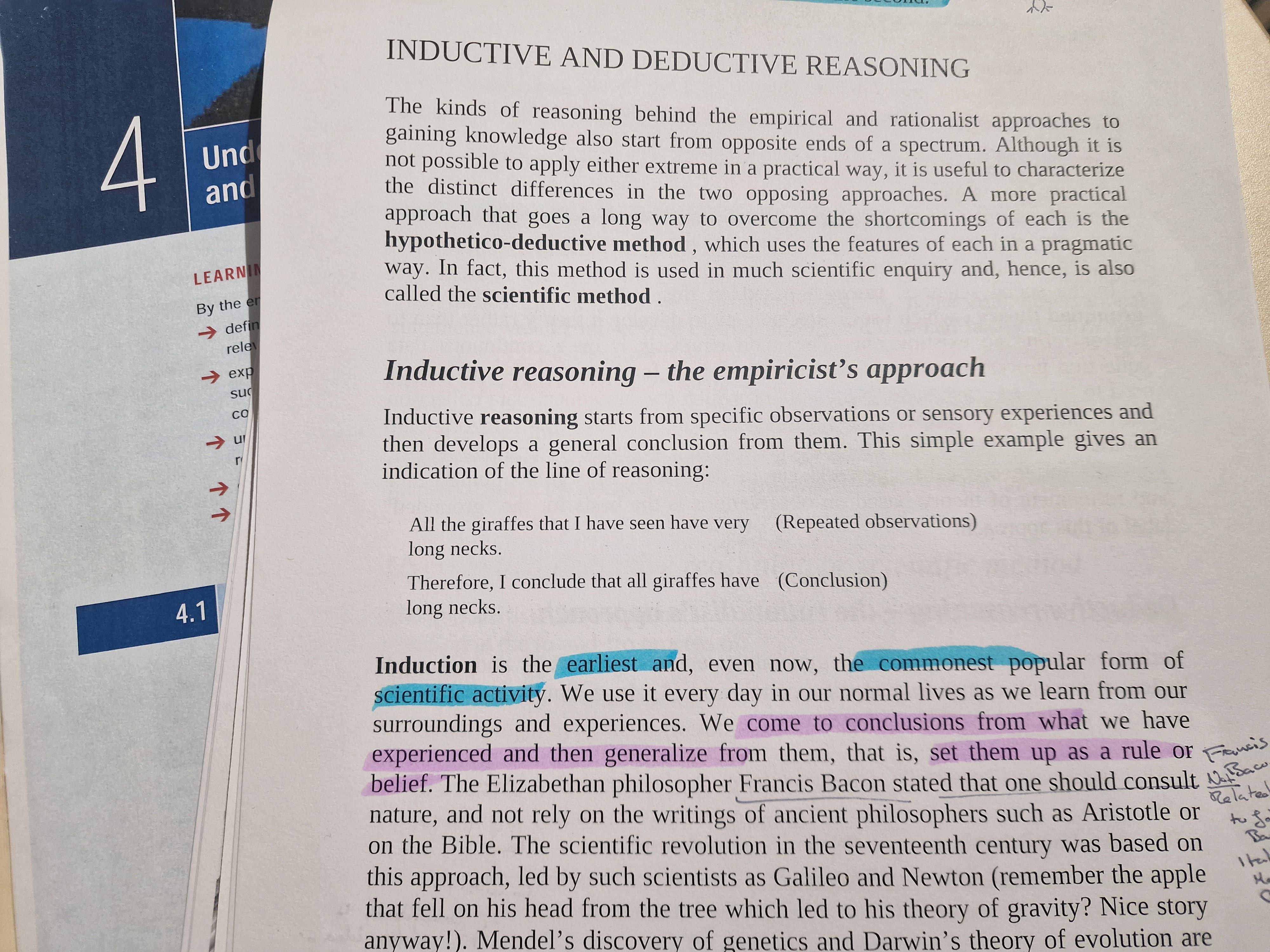 Image source:me8, Text Included Source6
And that brings me to this blog's review. When I installed obsidian, I was happy to find something that is easily locally installed, free from
Google's or Microsofts prying eyes. All I had to do was choose where I wanted my files (known as a 'vault' in Obsidian). Setting up your own
hotkeys can be a pain. I mean how many keyboard combinations can one possibly make, but it makes things easier in the long-term. Yet, I knew that
it had to be changed so I could use it to my needs.
I needed Adaptability;
to work with different file types, Visual Engagement; so I could immediately identify what was important with my eyes, and a way to work with the
Chinese language, through pdfs and the language itself. I decided I needed to explore what others user experiences were. As such I came across a
blog by Emile Van Krieken7.
Emile's blog
1) Explained tag and file hierarchies,
2) how they allow for a knowledge graph to be made within Obsidian,
3) highlighted the use of plug-ins to customise their experience.
Of these three points, the plug-ins interested me the most. As my goal was to turn obsidian into a tool that I could use for Chinese. So I looked
into the community plugins, and off I went exploring.
 My Obsidian Vault Settings and Plugin Menu8
Here I found 2 immediately useful plugins, PDF++ as suggested by Emile in their blog, and Zhongwen Reader, the name reminding me of an old friend,
Zhongwen Dictionary. (I have no way to confirm who is behind the originals creation, I tried. And Zhongwen isn't particularly unique as
Chinese "中文" phonetically is zhōng wén, but it felt like a little reunion. The plugin itself only has a little over 500 downloads so it certainly
felt like I had found my own niche community once again)
With the installation of plugins comes the rearranging of hotkeys, and figuring out new features. A bit of a hill to overcome in terms of getting
adjusted to all the features, but with light adjustions and mindset, it's an accessible tool for those that need it.
The feel of Obsidian is immediately, different, to most note taking tools. With Google Docs you just go right ahead and start typing. Choose
if you're really going for that
IMPACT FONT
or you can choose to be normal. While Obsidian immediately gives the look of a well built tool. It's features presented for
immediately and slightly intimidating. The knowledge graph, idly pulling ideas, the vault empty, patiently waiting a perfect file system, side bars
filled with icons, their
uses hidden to the meek. Luckily, I've spent a lot of time arranging my flashcard files in pleco. Updating my vocabulary, removing those that I had
mastered.
 My ongoing Flashcard collection,~circa mid 2024-present8
So the vault itself, was inviting. I was glad I could personalise my files system, and the visuals were a nice change from PLECO's standard and
boring look. And the Zhongwen Reading extension, though not the exact same style as Zhongwen Dictionary, was definitely an upgrade with it's
ability
to combine PLECO and Zhongwen Dictionary with an instant vocabulary list maker, easy to export into flashcards.
The only downside is that I have
currently no use for the knowledge graph and it feels like a waste. I don't find myself making a use of it. It's definitely pretty but I'd prefer
less movement. When I move one node I don't want everything else to go with it and ruin the map I had. It's overly dynamic movement is
counterintuitive to it's goal of creating a visual understanding of the files. It's more of a "concept" graph rather than an actual map of the
files. Which certainly is useful if you forgot where you put a file or need to introduce someone to your ideas, but for myself, not a tool I'd use.
In future I'll probably try to find a plugin that replaces it with a flowchart maker so that I can pin it to each different file "grouping" or
project and have a unique graph for each on the sidebar. Added with the ability to add quick postcard notes into it I think it would more naturally
reflect how on paper ideas and brainstorms are made.
However what really makes Obsidian a better tool is it's community contributors. Those who use the tool often, mostly
academics like Emile, know their needs, and create solutions for their problems and share them with others in the hopes that someone else will use
that tool and solve their own problems. All to make Obsidian a more optimised tool for everyone. It thrives because of it's users. And if you want
to take your private notes into a public or commercial sphere, all you need to do is get a license for it. Obsidian doesn't limit it's user on
ethical uses of its product. If you have any doubts you can make use of the community support on discord or reddit or make an inquiry on their
official help site.
The only issue I have with it is Obsidian Sync, though it's not a complaint about the use of it, rather the concept. I'd rather not have my files
become synced to an external cloud storage other than the storage on my designated devices. I'd like an option for manual syncing to be made, where
you can copy your vault on a USB and key, add it to a secondary device and the two devices act as each others cloud storage, without the use of a
third. Obsidian could sell you the key, sure, if they want a profit, but after that all I have to do it occasionally remember to have both my
devices be online or connected to sync. It's certainly not a common complaint that many would have but for security and my general aversion to
anything I must use but do not own, it would "scratch that itch", as Erica neatly put it3.
As a reviewer, I'm obliged to a final remark. I'm used to using shortcuts all around my devices, but it
took me a while to set up with all the plugins. As for swearing my continued usage, I shall. Although imperfect it is most closely alligned
to what I believe a useful text tool, and I will be adapting both Obsidian and my work flow
in my journey, to a more optimised flow. However, for a casual note taker, I'm not sure if the effort would be
initially worth it. While I'm sure that there will be many others like myself who will find this tool reuninting them with old tools, like my
beloved Dictionary, or bringing them on unexpected journeys of creation, as the community of plugin creators is fond of doing. I wouldn't recommend
this tool to anyone unfamiliar with, at the least, ctrl+c/v/f and knows that alt+f4 is not the secret button to completing your homework.
The tool itself, gives me hope for opens source and open contribution tools, although Obsidian itself isn't open source, it closely relies on it's
ideology, a fundamental principle of Digital Humanities. The open contribution to the tool is a self sustaining environment. There will always be
people who want a more perfect tool for their work, and always those willing to make those improvements. So Obsidian has found itself a new home in
my laptops file systems. A tool used by a myriad of people, with different goals, and different systems of use. And all of them using the same tool
due to its versatile and undeniably adaptive framework. There are certain thanks in order for those who create tools because they believe in a
greater benefit and true use.
References
- Obsidian.md, © 2025, https://obsidian.md
- Autumn Frisk,"Autumn's Sky Cove", Accessed on 24.02.2026 (Constantly really, she asks me for critique, love her <3),https://www.autumn.onl/links
- NessLabs Editorial Team, "Exploring the power of note-making with the co-founder of Obsidian", nesslabs.com ,August 6th, 2021,https://nesslabs.com/obsidian-featured-tool
- Zhongwen: Chinese-English Dictionary Chrome Extension Zhongwen-Chinese-English-Dictionary MUST BE OPENED ON CHROME BROWSER
- Pleco.com, August 16th, 2025, https://www.pleco.com
- Walliman, N.W, 2017, Research Methods the basics Second Edition, Social Science
- Emile Van Krieken, "How I use Obsidian for academic work", emilevankrieken.com, October 16th, 2025,
https://www.emilevankrieken.com/blog/2025/academic
-obsidian/
- These images, taken by me, are public domain, no copyrights will or have been made.
I chose to engage with and review the tool, Obsidian1. A markup note taking and graphing application. I saw it a few times on my social media recommended pages. I finally chose to use it when I was looking on my friends personal website's recommended tools2 and decided to try it.
I have my niche. Mine is why I chose to study at UCC instead of other Universities.
Chinese Novels, often without official translation, are scattered in the internet, pursued by avid Chinese Learners, such as myself. They're often without official translations, especially since I enjoy lgbtq+ themed novels. And while it is my pleasure to find fan-translated thousand page novels. For the unpopular and poorly translated, done by machine (mtl), it is less then ideal to enjoy. So I settled on a goal. To learn Chinese and read these novels in the language intended to describe their landscapes, artistry ,and imagery, to fill in the gaps of translation errors with my own efforts.
Chinese, however, been quite the journey. And over the years of my ever-evolving learning journey, I've used many tools. This blog explores my latest addition, Obsidian.
Obsidian was made by Co-Founders Shida Li and Erica Xu, who developed it while attending Waterloo University, Ontario. In an interview with NessLabs,3 Erica mentioned how she wanted it to be a "holy-grail notetaking app". It is now developed by the company Dynalist, a previous creation by Shida and Erica. Made during The Pandemic Quarantine of 2020, they set out to create this "holy grail" of note-taking. Which is now used by many academics, but also by users for list making, daily trackers, or anything related to texts. This leads to my experience with Obsidian and why I needed a new tool.
For building my early Chinese vocabulary I used a combination of a chrome browser extension, Zhongwen: Chinese English Dictionary 4 and PLECO 5 , a flashcard and note database creator for mobile devices. Essentially, Zhongwen, is a translator that works for any Chinese text you hover your mouse over, and it would show the words direct translation and phonetic pronunciation. I'd read through the texts in Chinese, find a word, hover to understand and then add it into my flashcards on my phone. Using the two together was awkward but worked. And though the extension did later add a way to add words directly into their own flashcard system, but at that point my own flashcard database was already extensive and incompatible with the Zhongwen extension.
It was a useful system until I switched browsers and search engines from Chrome+Google to Opera+DuckDuckGo. Unfortunately this ruined my original system of learning. I needed to work on longer texts, for comprehension, homework, and translation. Using Google docs didn't meet my needs, as it only recently started accepting markdown language. And while it is useful for group projects with it's comments and suggestion features, it doesn't supports importing pdfs for editing; A major source of my Chinese Texts. So I switched to paper note taking. Slower but it allowed more creative freedom for me to take my notes and turn them into whatever I needed them to be. I couldn't edit directly on to the pdfs, but I found slow work-arounds.
Image source:me8, Text Included Source6
And that brings me to this blog's review. When I installed obsidian, I was happy to find something that is easily locally installed, free from Google's or Microsofts prying eyes. All I had to do was choose where I wanted my files (known as a 'vault' in Obsidian). Setting up your own hotkeys can be a pain. I mean how many keyboard combinations can one possibly make, but it makes things easier in the long-term. Yet, I knew that it had to be changed so I could use it to my needs.
I needed Adaptability; to work with different file types, Visual Engagement; so I could immediately identify what was important with my eyes, and a way to work with the Chinese language, through pdfs and the language itself. I decided I needed to explore what others user experiences were. As such I came across a blog by Emile Van Krieken7.
Emile's blog
1) Explained tag and file hierarchies,
2) how they allow for a knowledge graph to be made within Obsidian,
3) highlighted the use of plug-ins to customise their experience.
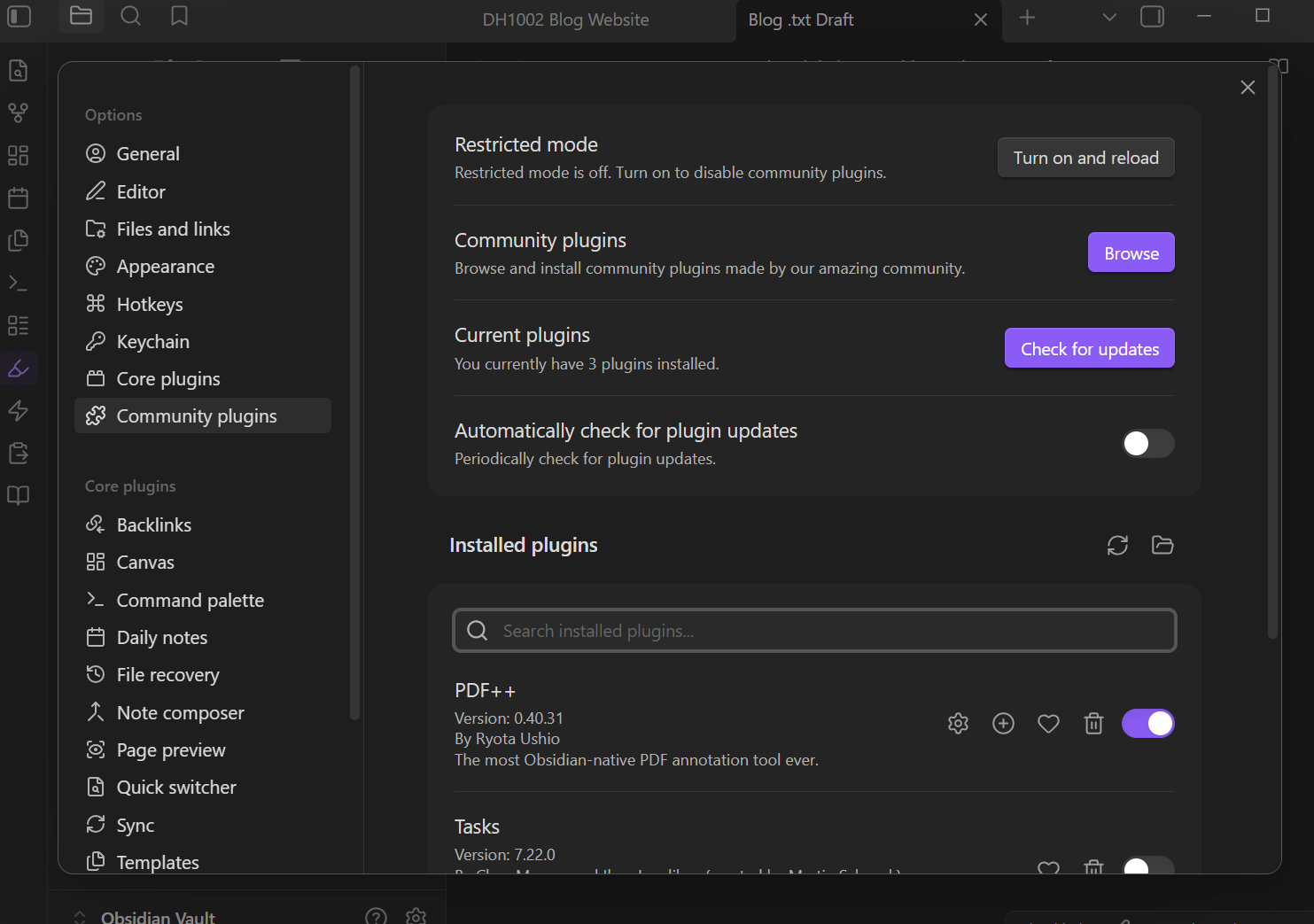
Of these three points, the plug-ins interested me the most. As my goal was to turn obsidian into a tool that I could use for Chinese. So I looked into the community plugins, and off I went exploring.My Obsidian Vault Settings and Plugin Menu8
Here I found 2 immediately useful plugins, PDF++ as suggested by Emile in their blog, and Zhongwen Reader, the name reminding me of an old friend, Zhongwen Dictionary. (I have no way to confirm who is behind the originals creation, I tried. And Zhongwen isn't particularly unique as Chinese "中文" phonetically is zhōng wén, but it felt like a little reunion. The plugin itself only has a little over 500 downloads so it certainly felt like I had found my own niche community once again)
With the installation of plugins comes the rearranging of hotkeys, and figuring out new features. A bit of a hill to overcome in terms of getting adjusted to all the features, but with light adjustions and mindset, it's an accessible tool for those that need it.
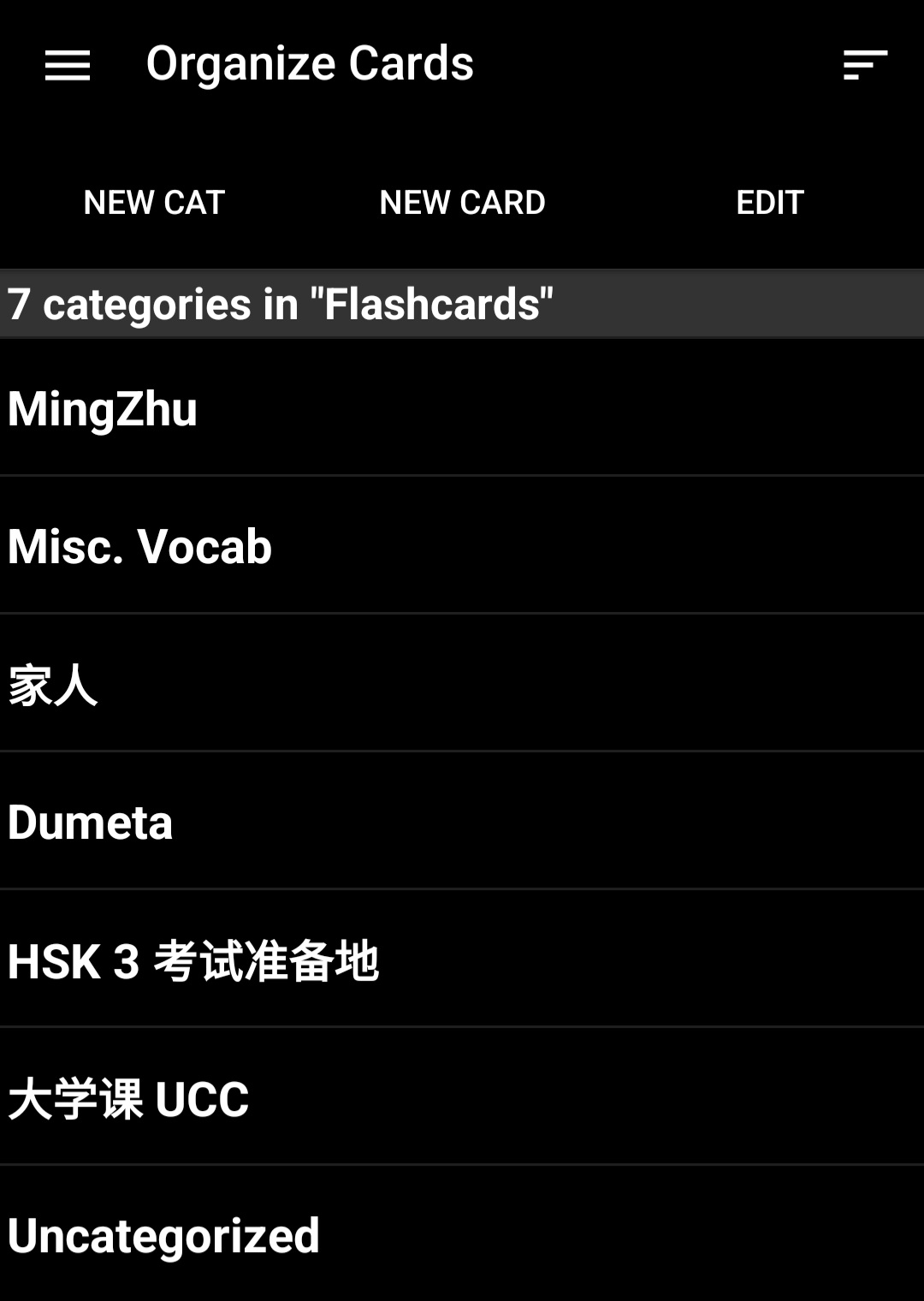
The feel of Obsidian is immediately, different, to most note taking tools. With Google Docs you just go right ahead and start typing. Choose if you're really going for that IMPACT FONT or you can choose to be normal. While Obsidian immediately gives the look of a well built tool. It's features presented for immediately and slightly intimidating. The knowledge graph, idly pulling ideas, the vault empty, patiently waiting a perfect file system, side bars filled with icons, their uses hidden to the meek. Luckily, I've spent a lot of time arranging my flashcard files in pleco. Updating my vocabulary, removing those that I had mastered.
My ongoing Flashcard collection,~circa mid 2024-present8
So the vault itself, was inviting. I was glad I could personalise my files system, and the visuals were a nice change from PLECO's standard and boring look. And the Zhongwen Reading extension, though not the exact same style as Zhongwen Dictionary, was definitely an upgrade with it's ability to combine PLECO and Zhongwen Dictionary with an instant vocabulary list maker, easy to export into flashcards.
The only downside is that I have currently no use for the knowledge graph and it feels like a waste. I don't find myself making a use of it. It's definitely pretty but I'd prefer less movement. When I move one node I don't want everything else to go with it and ruin the map I had. It's overly dynamic movement is counterintuitive to it's goal of creating a visual understanding of the files. It's more of a "concept" graph rather than an actual map of the files. Which certainly is useful if you forgot where you put a file or need to introduce someone to your ideas, but for myself, not a tool I'd use. In future I'll probably try to find a plugin that replaces it with a flowchart maker so that I can pin it to each different file "grouping" or project and have a unique graph for each on the sidebar. Added with the ability to add quick postcard notes into it I think it would more naturally reflect how on paper ideas and brainstorms are made.
However what really makes Obsidian a better tool is it's community contributors. Those who use the tool often, mostly academics like Emile, know their needs, and create solutions for their problems and share them with others in the hopes that someone else will use that tool and solve their own problems. All to make Obsidian a more optimised tool for everyone. It thrives because of it's users. And if you want to take your private notes into a public or commercial sphere, all you need to do is get a license for it. Obsidian doesn't limit it's user on ethical uses of its product. If you have any doubts you can make use of the community support on discord or reddit or make an inquiry on their official help site.
The only issue I have with it is Obsidian Sync, though it's not a complaint about the use of it, rather the concept. I'd rather not have my files become synced to an external cloud storage other than the storage on my designated devices. I'd like an option for manual syncing to be made, where you can copy your vault on a USB and key, add it to a secondary device and the two devices act as each others cloud storage, without the use of a third. Obsidian could sell you the key, sure, if they want a profit, but after that all I have to do it occasionally remember to have both my devices be online or connected to sync. It's certainly not a common complaint that many would have but for security and my general aversion to anything I must use but do not own, it would "scratch that itch", as Erica neatly put it3.
As a reviewer, I'm obliged to a final remark. I'm used to using shortcuts all around my devices, but it took me a while to set up with all the plugins. As for swearing my continued usage, I shall. Although imperfect it is most closely alligned to what I believe a useful text tool, and I will be adapting both Obsidian and my work flow in my journey, to a more optimised flow. However, for a casual note taker, I'm not sure if the effort would be initially worth it. While I'm sure that there will be many others like myself who will find this tool reuninting them with old tools, like my beloved Dictionary, or bringing them on unexpected journeys of creation, as the community of plugin creators is fond of doing. I wouldn't recommend this tool to anyone unfamiliar with, at the least, ctrl+c/v/f and knows that alt+f4 is not the secret button to completing your homework.
The tool itself, gives me hope for opens source and open contribution tools, although Obsidian itself isn't open source, it closely relies on it's ideology, a fundamental principle of Digital Humanities. The open contribution to the tool is a self sustaining environment. There will always be people who want a more perfect tool for their work, and always those willing to make those improvements. So Obsidian has found itself a new home in my laptops file systems. A tool used by a myriad of people, with different goals, and different systems of use. And all of them using the same tool due to its versatile and undeniably adaptive framework. There are certain thanks in order for those who create tools because they believe in a greater benefit and true use.
References
- Obsidian.md, © 2025, https://obsidian.md
- Autumn Frisk,"Autumn's Sky Cove", Accessed on 24.02.2026 (Constantly really, she asks me for critique, love her <3),https://www.autumn.onl/links
- NessLabs Editorial Team, "Exploring the power of note-making with the co-founder of Obsidian", nesslabs.com ,August 6th, 2021,https://nesslabs.com/obsidian-featured-tool
- Zhongwen: Chinese-English Dictionary Chrome Extension Zhongwen-Chinese-English-Dictionary MUST BE OPENED ON CHROME BROWSER
- Pleco.com, August 16th, 2025, https://www.pleco.com
- Walliman, N.W, 2017, Research Methods the basics Second Edition, Social Science
- Emile Van Krieken, "How I use Obsidian for academic work", emilevankrieken.com, October 16th, 2025, https://www.emilevankrieken.com/blog/2025/academic -obsidian/
- These images, taken by me, are public domain, no copyrights will or have been made.